



Teseo
Kiosks for all needs
Enhancing patient autonomy
The Kiosk24/7 units are highly functional, fast, easy to use, durable, and convenient to position in any area within a healthcare facility.
Operating 24 hours a day, seven days a week, they perform a wide range of functions from queue elimination to managing complex patient flows. By offering numerous self-service options, these kiosks help avoid queues at reception, reduce patient waiting times, optimize processing times, and lighten the workload of healthcare staff.
TESEO
The latest version of the Kiosk24/7 range is designed to be intuitive, easy to use, and clear even for less experienced users, offering an excellent user experience for operations such as administrative check-in, medical report collection, and autonomous payment management.
- Powder-coated epoxy steel panels and profiles, scratch-resistant and corrosion-resistant
- Front panels with rounded corners for enhanced safety in crowded environments
- Compliance with ADA (American Disabilities Act) regulations for people with disabilities
- Double security lock against vandalism acts
- System and peripheral access restricted to maintenance technicians
- Monitoring and alert system for notifications in case of anomalies
- Compliance with CE regulations
- Components compliant with RoHS and WEEE regulations
Request more information
Managed flows
The Teseo kiosks enable the management of one or more flows, with well-defined configurability for each flow, ensuring the necessary flexibility without compromising usability, functionality, and reliability of every service.
Integration with document repositories, facility management software, banking terminal interfaces, and automated verification systems guarantees total control over operations.
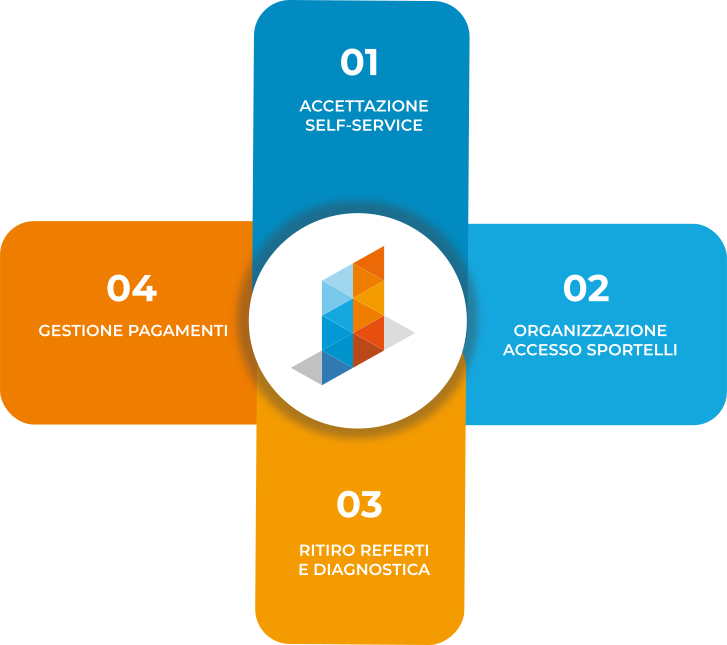
Self-service check-in
(self check-in)
Allows patients to independently and quickly complete the admission procedures to the healthcare facility.
After identification, patients access the outpatient waiting lists and can avoid queues at reception desks.
The flow is activated through integration with the healthcare facility’s management system, enabling retrieval of booking data.
Counter access organization
(Queue management system)
Provides patients with a ticket to join the queue at the counters and, through an intuitive interface, updates them on the waiting times for access to the service.
Report and diagnostic retrieval
(Printing and download)
Allows autonomous retrieval of the report, either by printing on A4 paper or by downloading to a USB drive (in PDF format). It is also possible to retrieve radiology report images, if available, in various compressed formats.
Activation requires system integration to verify patient data and associate the report stored in the document repository. In the case of radiology reports, a web service connection is also necessary.
Payment management
(electronic cards)
Enables patients to view their pending practices in the healthcare facility’s CUP system and to proceed with payment via electronic card.
Payments can also be made contactlessly through the POS module installed on the kiosk, turning it into a fully self-service counter.
The kiosk interfaces with the bank terminal manager used by the healthcare organization.
Main operational steps
Self Check-In
Patient identification
User identification with health card and chip card reader or barcode scanning
Case recognition
Reading the barcode on the practice document and recognizing the booking data through the healthcare facility’s management system
Selection of retrieval method
Verification of the validity of the practice and payments according to predefined criteria.
In case of discrepancies, a personalized message is displayed with instructions on the steps needed to regularize the practice.
Ticket printing and queueing
Issuance of a queue ticket with call number.
Optional response message to the healthcare facility’s management system notifying patient acceptance.
Report printing and retrieval
Patient identification
User identification with health card and chip card reader or barcode scanning
Recognition of the case or booking
Reading the barcode on the practice document and recognizing the booking data through the healthcare organization’s management system
Selection of retrieval method
Choice between printing on A4 paper or downloading the digital file in PDF format
Download of digital reports to USB (DICOM format)
Patient identification
User identification with health card and chip card reader or barcode scanning
Recognition of the case or booking
Reading the barcode on the practice document and recognizing the booking data through the healthcare facility’s management system
Saving to USB drive
Saving the report onto a USB or USB 3.0 drive for files larger than 300 Mb
Payment management
Patient identification
User identification with health card and chip card reader or by scanning the barcode.
Payment list retrieval
Display of the list of payments to be made through access to a web service of the healthcare facility.
Payment via POS
Access to the payment procedure guided by instructions provided by the totem’s POS module. The totem issues the payment receipt and can print the invoice.